-
 Call Now ! 7905582725
 -
 Email Now Help@makerspacekanpur.com
NeoPixel is Adafruit’s name for individually addressable RGB LEDs using the WS2812 or WS2812B chip. Each LED contains:
Red, Green, Blue LED
A tiny controller (built-in)
Only one data pin needed to control the entire strip or ring
ESP32 (any variant)
NeoPixel LED strip/ring (WS2812)
470Ω resistor (optional for data pin)
1000µF capacitor (optional for stability)
Power source (5V) – USB or external
Breadboard and jumper wires
| NeoPixel Pin | Connect to |
|---|---|
| VCC / 5V | 5V (ESP32 or external) |
| GND | GND of ESP32 |
| DIN / DI | GPIO (e.g. GPIO 5) of ESP32 |
⚠️ Use a level shifter or a resistor voltage dropper if running at 5V for better reliability. ESP32 uses 3.3V logic.
Control via one wire
Uses timing-sensitive protocol
Supports RGB or RGBW (some variants)
Requires a precise timing library (we use Adafruit_NeoPixel)
Go to Tools > Library Manager and install:
Adafruit NeoPixel
Static Color:
Blink One LED:
Color Wipe:
Each LED can draw up to ~60mA at full brightness white
Use external 5V power if using more than ~8–10 LEDs
Always connect GND of power supply to ESP32 GND
Smart Home ambient lighting
IoT notifications (e.g., weather color codes)
Wearables and costumes
Interactive LED walls or clocks
Audio-reactive visualizers
ESP32 is very fast, but NeoPixels require precise timing. Don’t use delayMicroseconds() carelessly or interrupt timing-sensitive code.
Avoid using WiFi and NeoPixels simultaneously unless using compatible timing libraries or dual-core programming (Task API).
For better performance with WiFi + NeoPixel, try FastLED with RMT support or use I2S-based LEDs (e.g., APA102).
HOW TO OPERATE


As per official documentation Step by step process for pico program run after power on:Save your pyt...

ESP32 Board are so popular? Mainly because of the following featuresLow-costBluetoothWiFiLow PowerDu...

Node MCU ESP8266 Board are so popular? Mainly because of the following features.Its true Arduino Kil...

🔧 Basic IntroductionL298N is a dual H-Bridge motor driver IC that allows controlling the direction...

🔧 Components Needed:ComponentQuantityESP32 Dev Board1L298N Motor Driver Module1DC Gear Motors (TT o...

The ADXL335 is a small, thin, low-power 3-axis analog accelerometer manufactured by Analog Devices....

🧠 What is an Ultrasonic Sensor?An ultrasonic sensor is a device that uses sound waves to detect how...

📌 What is the DHT11 Sensor?The DHT11 is a basic, low-cost digital temperature and humidity sensor....

🔥 FIRE BOT – Bluetooth Controlled Fire Extinguisher RobotWelcome to the FIRE BOT project! This robo...

BMP180 Sensor: Digital Barometric Pressure SensorThe BMP180 is a digital barometric pressure sensor...

🔧 1. Hardware Overview: 1.8" TFT DisplayMost 1.8" TFT modules are based on the ST7735 driver and co...

The SSD1306 is a popular controller used in OLED (Organic Light Emitting Diode) displays, most commo...

A servo motor is a type of motor designed for precise control of angular position, making it ideal f...
.png)
The Gravity Voice Recognition Module is a user-friendly module developed by DFRobot that allows micr...
.png)
The APDS-9960 is an advanced, compact sensor from Broadcom (formerly Avago Technologies) that offers...

🔍 What is the 28BYJ-48 Stepper Motor?The 28BYJ-48 is a 5V unipolar stepper motor with a built-in re...

How Soil Moisture Sensor Works and Interface it with Esp32 When you hear the term “smart garden,” on...

🔧 What is an Analog Joystick?An analog joystick typically has:2 potentiometers (one for X-axis, one...

📡 What is the NEO-8M GPS Module?The NEO-8M is a high-precision GNSS GPS receiver by u-blox, capable...

🧠 What is a PIR Sensor?PIR = Passive Infrared SensorA PIR sensor detects motion by measuring change...

✅ What is AI Thinker GP-02?The AI Thinker GP-02 is a GNSS (GPS) module, designed to work with satel...

📡 What is SIM900?The SIM900 is a GSM/GPRS module from SIMCom. It allows microcontrollers like ESP32...

🧠 What is a Push Button?A push button is a simple mechanical switch that connects two points in a c...

🤔 What is a Tilt Sensor?A tilt sensor (also called a ball switch or mercury switch) is a digital sw...

🎨 What is the TCS34725?The TCS34725 is a color sensor made by AMS (now part of Renesas).It detects...

📘 What is an I2C LCD?An I2C LCD is a Liquid Crystal Display that uses the I2C communication protoco...

🧠 What is MPU6050?The MPU6050 is a 6-axis motion tracking device made by InvenSense. It combines:✅...

🌡️ What is DS18B20?The DS18B20 is a digital temperature sensor from Maxim Integrated (now Analog Dev...

⏰ What is DS1307 RTC?The DS1307 is a real-time clock IC by Maxim Integrated that keeps track of:Sec...

🎵 What is DFPlayer Mini?The DFPlayer Mini is a tiny, standalone MP3 audio player module. It can pla...

📡 What is an IR Receiver?An IR (Infrared) Receiver module receives signals from an IR remote contro...

📌 What is a Rotary Encoder?A rotary encoder is an electro-mechanical sensor that converts the angul...

📌 What is the Dot Matrix Display with MAX7219?A Dot Matrix Display is an arrangement of LEDs in a g...
.png)
📌 What is ESP-NOW?ESP-NOW is a wireless communication protocol developed by Espressif, allowing ESP...
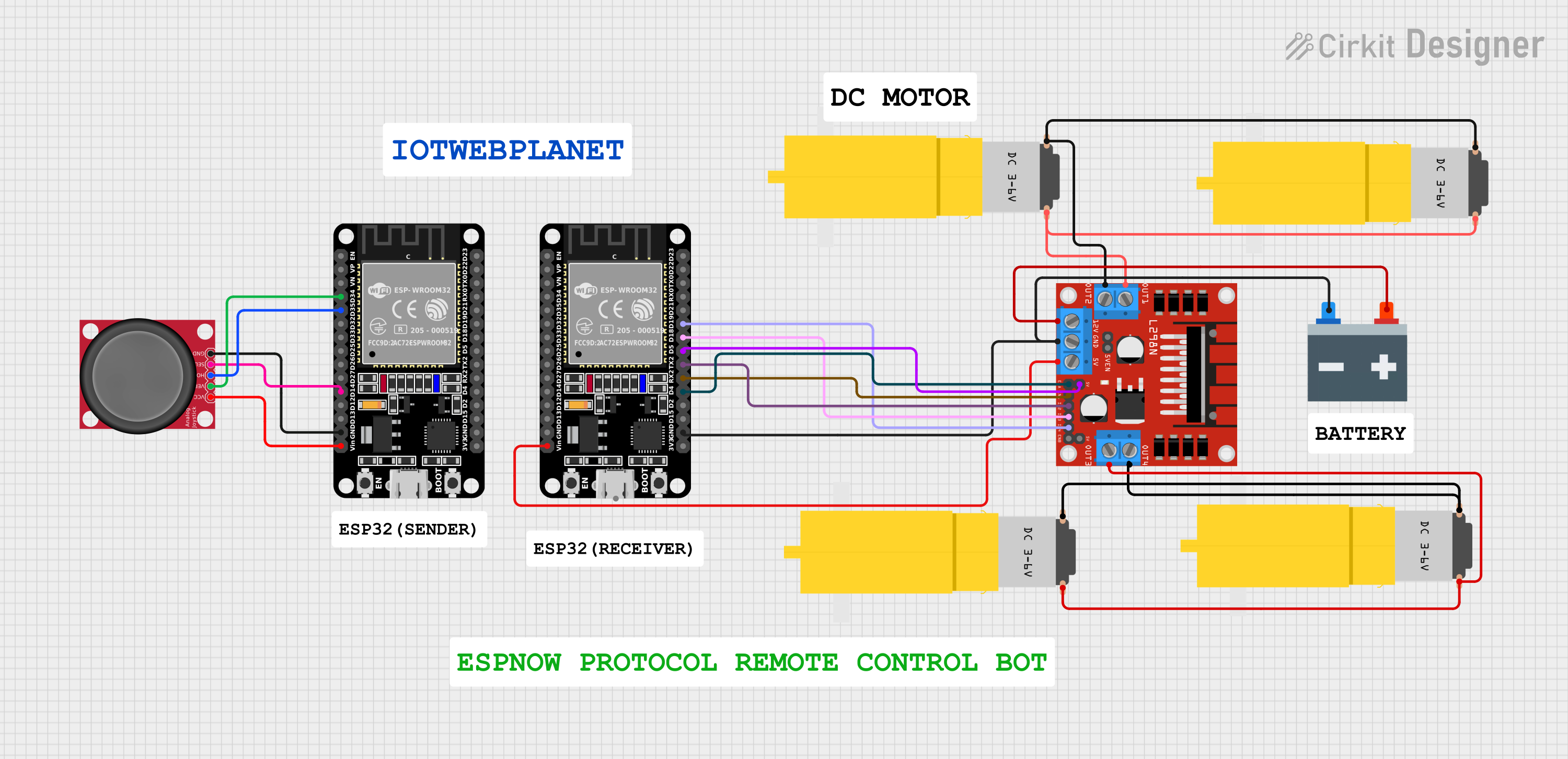
🤖 ESP32 Joystick Controlled Robot Using ESP-NOW Protocol & L298N Motor DriverWireless bot control w...
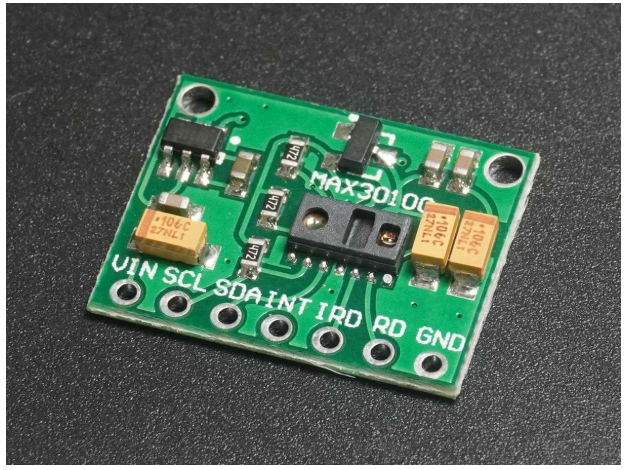
❤️ Heart Rate & SpO₂ Sensor (MAX30100/MAX30102)🔬 Pulse Sensor | SpO₂ Monitor | Wearable Health Tech...
