-
 Call Now ! 7905582725
 -
 Email Now Help@makerspacekanpur.com
An IR (Infrared) Receiver module receives signals from an IR remote control (like TV remotes) and decodes them. It typically uses modulated IR light at 38 kHz.
The most common IR receiver is the VS1838B or HS0038, and it comes in modules with 3 pins:
OUT (Signal)
GND
VCC (usually 3.3V–5V)
The remote control sends IR light pulses in a specific pattern.
The IR receiver demodulates the 38 kHz signal and gives digital output (HIGH/LOW).
The ESP32 reads this pattern and decodes it into a code (usually hexadecimal).
| IR Receiver Pin | Connect to ESP32 |
|---|---|
| OUT | Any GPIO (e.g., GPIO18) |
| VCC | 3.3V or 5V (Check module specs) |
| GND | GND |
ESP32 Dev Board
IR Receiver Module (VS1838 or similar)
IR Remote (any remote like TV, DVD, etc.)
Jumper Wires
Arduino IDE
📚 6. Required Library
Install the DIYables_IRcontroller library:
Open Arduino IDE
Go to → Tools → Manage Libraries
Search for: DIYables_IRcontroller
Click Install
🛠️ 10. Common Issues & Fixes
Problem Fix No signal detected Wrong GPIO or poor VCC/GND connection Always same code Remote not compatible or low battery Codes change frequently Use resultToHexidecimal(&results)only
🎮 11. Projects Using IR Receiver
IR Remote-controlled lights
Home automation (TV remote → fan, light, etc.)
IR controlled car or robot
Media player navigation
IR smart switch
Educational quiz buzzer system
🔀 12. Advanced Use Cases
Control multiple devices (e.g., fan, speaker, lights)
Build an IR signal logger
Create a universal remote decoder
Combine with DFPlayer Mini for a remote-controlled audio player
HOW TO OPERATE
#include <DIYables_IRcontroller.h> // DIYables_IRcontroller library#define IR_RECEIVER_PIN 18 // The Arduino pin connected to IR controller
DIYables_IRcontroller_21 irController(IR_RECEIVER_PIN, 200); // debounce time is 200ms
void setup() {Serial.begin(9600);irController.begin();}
void loop() {Key21 command = irController.getKey();if (command != Key21::NONE) {switch (command) {case Key21::KEY_CH_MINUS:Serial.println("CH-");// TODO: YOUR CONTROLbreak;
case Key21::KEY_CH:Serial.println("CH");// TODO: YOUR CONTROLbreak;
case Key21::KEY_CH_PLUS:Serial.println("CH+");// TODO: YOUR CONTROLbreak;
case Key21::KEY_PREV:Serial.println("<<");// TODO: YOUR CONTROLbreak;
case Key21::KEY_NEXT:Serial.println(">>");// TODO: YOUR CONTROLbreak;
case Key21::KEY_PLAY_PAUSE:Serial.println(">||");// TODO: YOUR CONTROLbreak;
case Key21::KEY_VOL_MINUS:Serial.println("-");// TODO: YOUR CONTROLbreak;
case Key21::KEY_VOL_PLUS:Serial.println("+");// TODO: YOUR CONTROLbreak;
case Key21::KEY_EQ:Serial.println("EQ");// TODO: YOUR CONTROLbreak;
case Key21::KEY_100_PLUS:Serial.println("100+");// TODO: YOUR CONTROLbreak;
case Key21::KEY_200_PLUS:Serial.println("200+");// TODO: YOUR CONTROLbreak;
case Key21::KEY_0:Serial.println("0");// TODO: YOUR CONTROLbreak;
case Key21::KEY_1:Serial.println("1");// TODO: YOUR CONTROLbreak;
case Key21::KEY_2:Serial.println("2");// TODO: YOUR CONTROLbreak;
case Key21::KEY_3:Serial.println("3");// TODO: YOUR CONTROLbreak;
case Key21::KEY_4:Serial.println("4");// TODO: YOUR CONTROLbreak;
case Key21::KEY_5:Serial.println("5");// TODO: YOUR CONTROLbreak;
case Key21::KEY_6:Serial.println("6");// TODO: YOUR CONTROLbreak;
case Key21::KEY_7:Serial.println("7");// TODO: YOUR CONTROLbreak;
case Key21::KEY_8:Serial.println("8");// TODO: YOUR CONTROLbreak;
case Key21::KEY_9:Serial.println("9");// TODO: YOUR CONTROLbreak;
default:Serial.println("WARNING: undefined command:");break;}}}


As per official documentation Step by step process for pico program run after power on:Save your pyt...

ESP32 Board are so popular? Mainly because of the following featuresLow-costBluetoothWiFiLow PowerDu...

Node MCU ESP8266 Board are so popular? Mainly because of the following features.Its true Arduino Kil...

🔧 Basic IntroductionL298N is a dual H-Bridge motor driver IC that allows controlling the direction...

🔧 Components Needed:ComponentQuantityESP32 Dev Board1L298N Motor Driver Module1DC Gear Motors (TT o...

The ADXL335 is a small, thin, low-power 3-axis analog accelerometer manufactured by Analog Devices....

🧠 What is an Ultrasonic Sensor?An ultrasonic sensor is a device that uses sound waves to detect how...

📌 What is the DHT11 Sensor?The DHT11 is a basic, low-cost digital temperature and humidity sensor....

🔥 FIRE BOT – Bluetooth Controlled Fire Extinguisher RobotWelcome to the FIRE BOT project! This robo...

BMP180 Sensor: Digital Barometric Pressure SensorThe BMP180 is a digital barometric pressure sensor...

🔧 1. Hardware Overview: 1.8" TFT DisplayMost 1.8" TFT modules are based on the ST7735 driver and co...

The SSD1306 is a popular controller used in OLED (Organic Light Emitting Diode) displays, most commo...

A servo motor is a type of motor designed for precise control of angular position, making it ideal f...
.png)
The Gravity Voice Recognition Module is a user-friendly module developed by DFRobot that allows micr...
.png)
The APDS-9960 is an advanced, compact sensor from Broadcom (formerly Avago Technologies) that offers...

🔍 What is the 28BYJ-48 Stepper Motor?The 28BYJ-48 is a 5V unipolar stepper motor with a built-in re...

How Soil Moisture Sensor Works and Interface it with Esp32 When you hear the term “smart garden,” on...

🔧 What is an Analog Joystick?An analog joystick typically has:2 potentiometers (one for X-axis, one...

📡 What is the NEO-8M GPS Module?The NEO-8M is a high-precision GNSS GPS receiver by u-blox, capable...

🔧 What is a NeoPixel?NeoPixel is Adafruit’s name for individually addressable RGB LEDs using the WS...

🧠 What is a PIR Sensor?PIR = Passive Infrared SensorA PIR sensor detects motion by measuring change...

✅ What is AI Thinker GP-02?The AI Thinker GP-02 is a GNSS (GPS) module, designed to work with satel...

📡 What is SIM900?The SIM900 is a GSM/GPRS module from SIMCom. It allows microcontrollers like ESP32...

🧠 What is a Push Button?A push button is a simple mechanical switch that connects two points in a c...

🤔 What is a Tilt Sensor?A tilt sensor (also called a ball switch or mercury switch) is a digital sw...

🎨 What is the TCS34725?The TCS34725 is a color sensor made by AMS (now part of Renesas).It detects...

📘 What is an I2C LCD?An I2C LCD is a Liquid Crystal Display that uses the I2C communication protoco...

🧠 What is MPU6050?The MPU6050 is a 6-axis motion tracking device made by InvenSense. It combines:✅...

🌡️ What is DS18B20?The DS18B20 is a digital temperature sensor from Maxim Integrated (now Analog Dev...

⏰ What is DS1307 RTC?The DS1307 is a real-time clock IC by Maxim Integrated that keeps track of:Sec...

🎵 What is DFPlayer Mini?The DFPlayer Mini is a tiny, standalone MP3 audio player module. It can pla...

📌 What is a Rotary Encoder?A rotary encoder is an electro-mechanical sensor that converts the angul...

📌 What is the Dot Matrix Display with MAX7219?A Dot Matrix Display is an arrangement of LEDs in a g...
.png)
📌 What is ESP-NOW?ESP-NOW is a wireless communication protocol developed by Espressif, allowing ESP...
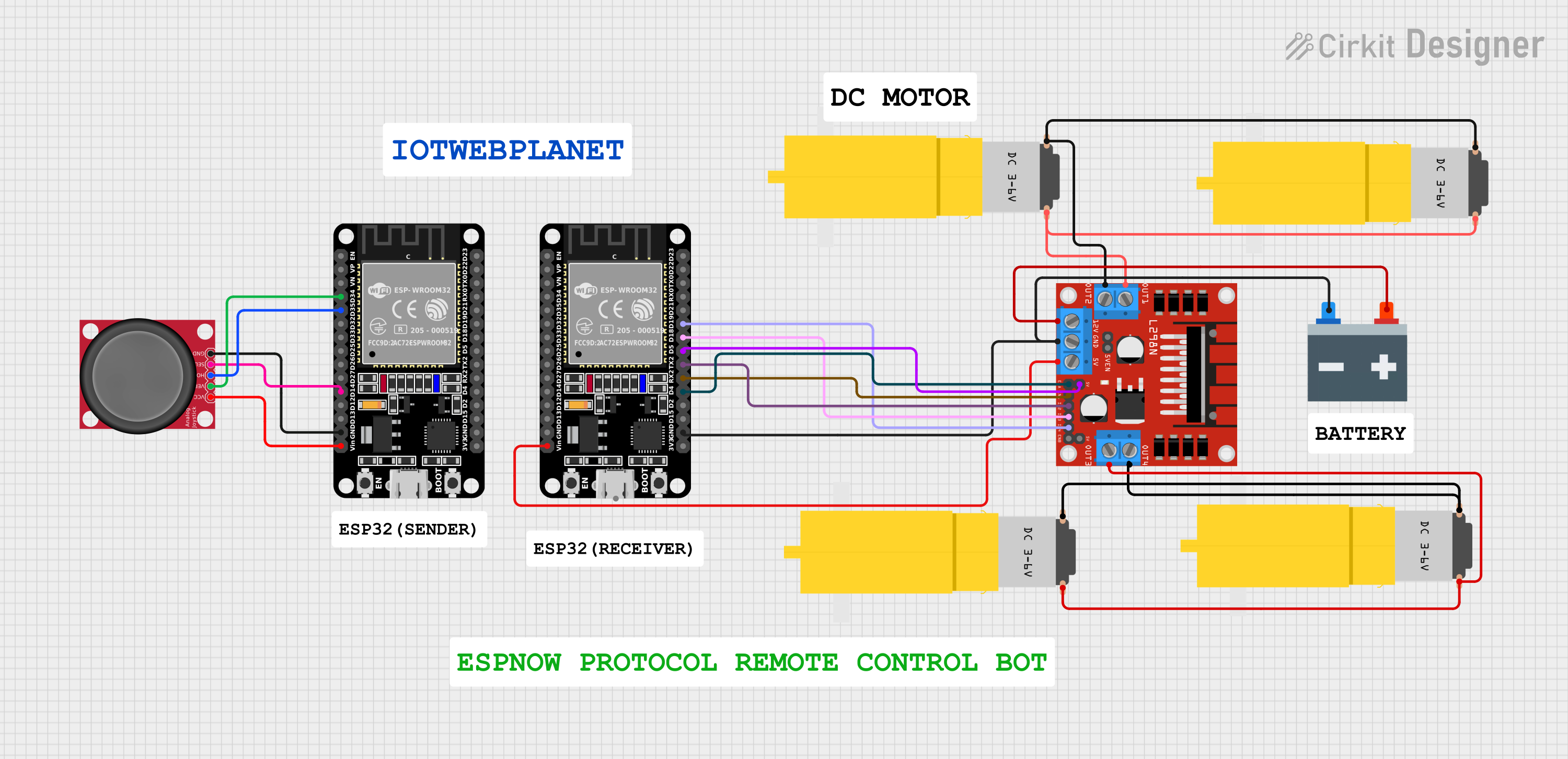
🤖 ESP32 Joystick Controlled Robot Using ESP-NOW Protocol & L298N Motor DriverWireless bot control w...
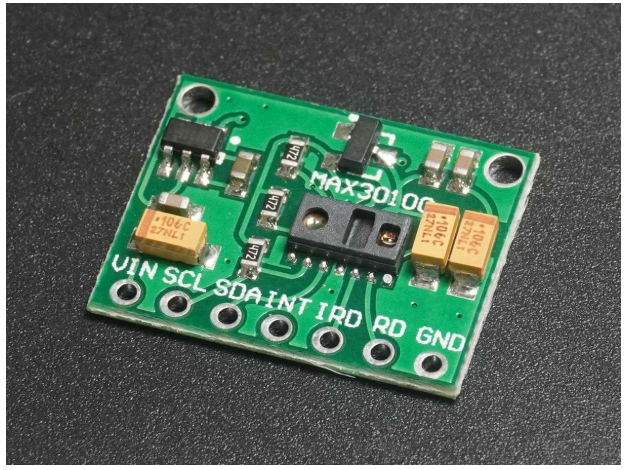
❤️ Heart Rate & SpO₂ Sensor (MAX30100/MAX30102)🔬 Pulse Sensor | SpO₂ Monitor | Wearable Health Tech...
