Follow us:-
0

ESP-NOW with ESP32

  • 26-07-2025

๐Ÿ“Œ What is ESP-NOW?

ESP-NOW is a wireless communication protocol developed by Espressif, allowing ESP32 boards to send and receive data directly without Wi-Fi or internet.


๐Ÿง  Key Features

  • ๐Ÿ“ก Peer-to-peer communication (up to 20 devices)

  • โšก Low power and fast (few milliseconds delay)

  • ๐Ÿ” Encrypted data transmission

  • ๐Ÿšซ No Wi-Fi router or internet needed

  • ๐Ÿ” Bi-directional communication supported


๐Ÿ”Œ Where to Use (Use Cases)

  • ๐ŸŽฎ Wireless joystick controller

  • ๐Ÿ  Smart home automation

  • ๐Ÿšจ Personal safety devices (like Safeguard+)

  • ๐ŸŒฑ Remote environment sensors

  • ๐Ÿš— Vehicle-to-vehicle communication

  • ๐ŸŽ“ College projects requiring mesh or local network


๐Ÿ› ๏ธ Components Needed

  • โœ… 2x ESP32 Boards

  • โœ… Micro USB cables

  • โœ… Arduino IDE installed

  • โœ… Sensor/input (e.g., joystick/keypad)

  • โœ… Output (e.g., LED, buzzer, OLED)


๐Ÿ“ How ESP-NOW Works

  • ESP32 uses its WiFi in STA mode (no router)

  • One board becomes sender, other is receiver

  • Data is sent in small packets (struct format)

  • Boards communicate using each other's MAC address


๐Ÿงช Applications

  • ๐Ÿ”˜ Wireless button panel

  • ๐Ÿ“ฆ Inventory scan/tag systems

  • ๐Ÿ”‹ Battery-operated remote devices

  • ๐Ÿ” Secure, private IoT devices (no cloud dependency)

  • ๐ŸŽ“ Ideal for IEEE & hackathon projects


๐Ÿ’ก Code Overview

Sender Side:

  • Initialize Wi-Fi STA mode

  • Register peer MAC address

  • Pack data using struct

  • Send using esp_now_send()

Receiver Side:

  • Register receive callback

  • Decode received struct

  • Perform action (like LED on, buzzer, Serial print)


๐Ÿ“‹ Notes

  • ๐Ÿ“ถ Keep both ESP32 on the same WiFi channel

  • ๐Ÿ“ Use only MAC Address of peer (receiver)

  • ๐Ÿ’ฌ Packet size should be under 250 bytes

  • ๐Ÿ”Œ Both must be in WiFi STA mode

  • ๐Ÿ”„ ESP-NOW doesn’t support IP-based networking (no HTTP/MQTT)


HOW TO CHECK MAC ADDRESS


/*
  Rui Santos & Sara Santos - Random Nerd Tutorials
  Complete project details at https://RandomNerdTutorials.com/get-change-esp32-esp8266-mac-address-arduino/
  Permission is hereby granted, free of charge, to any person obtaining a copy of this software and associated documentation files.  
  The above copyright notice and this permission notice shall be included in all copies or substantial portions of the Software.
*/
#include <WiFi.h>
#include <esp_wifi.h>

void readMacAddress(){
  uint8_t baseMac[6];
  esp_err_t ret = esp_wifi_get_mac(WIFI_IF_STA, baseMac);
  if (ret == ESP_OK) {
    Serial.printf("%02x:%02x:%02x:%02x:%02x:%02x\n",
                  baseMac[0], baseMac[1], baseMac[2],
                  baseMac[3], baseMac[4], baseMac[5]);
  } else {
    Serial.println("Failed to read MAC address");
  }
}

void setup(){
  Serial.begin(115200);

  WiFi.mode(WIFI_STA);
  WiFi.STA.begin();

  Serial.print("[DEFAULT] ESP32 Board MAC Address: ");
  readMacAddress();
}
 
void loop(){

}


SENDER ADDRESS CODE
 
 
/*
  Rui Santos & Sara Santos - Random Nerd Tutorials
  Modified by Akash for keypad input + ESP-NOW
*/

#include <esp_now.h>
#include <WiFi.h>
#include <Keypad.h>

// Define rows and columns
const byte ROWS = 4;
const byte COLS = 4;

// Define the key map
char keys[ROWS][COLS] = {
  {'1', '2', '3', 'A'},
  {'4', '5', '6', 'B'},
  {'7', '8', '9', 'C'},
  {'*', '0', '#', 'D'}
};

// Connect keypad ROW0, ROW1, ROW2 and ROW3 to these ESP32 pins
byte rowPins[ROWS] = {19, 18, 5, 17};

// Connect COL0, COL1, COL2, COL3 to these ESP32 pins
byte colPins[COLS] = {16, 4, 22, 15};

// Create keypad object
Keypad keypad = Keypad(makeKeymap(keys), rowPins, colPins, ROWS, COLS);

// Replace with receiver MAC Address
uint8_t broadcastAddress[] = {0x30, 0xC6, 0xF7, 0x22, 0xEB, 0xD8};

// Define message structure
typedef struct struct_message {
  char a[32];  // String data to send
} struct_message;

struct_message myData;
esp_now_peer_info_t peerInfo;

String inputBuffer = "";  // Buffer to store key inputs

// Callback function on successful/failed send
void OnDataSent(const uint8_t *mac_addr, esp_now_send_status_t status) {
  Serial.print("\r\nLast Packet Send Status:\t");
  Serial.println(status == ESP_NOW_SEND_SUCCESS ? "Delivery Success" : "Delivery Fail");
}

void setup() {
  Serial.begin(115200);

  // Set device as a Wi-Fi Station
  WiFi.mode(WIFI_STA);
  Serial.print("Sender MAC Address: ");
  Serial.println(WiFi.macAddress());

  // Init ESP-NOW
  if (esp_now_init() != ESP_OK) {
    Serial.println("Error initializing ESP-NOW");
    return;
  }

  // Register send callback
  esp_now_register_send_cb(OnDataSent);

  // Register peer
  memset(&peerInfo, 0, sizeof(peerInfo));
  memcpy(peerInfo.peer_addr, broadcastAddress, 6);
  peerInfo.channel = 0;
  peerInfo.encrypt = false;
  peerInfo.ifidx = WIFI_IF_STA;

  if (esp_now_add_peer(&peerInfo) != ESP_OK) {
    Serial.println("Failed to add peer");
    return;
  }

  Serial.println("ESP-NOW Sender Ready");
}

void loop() {
  char key = keypad.getKey();

  if (key) {
    Serial.print("Key Pressed: ");
    Serial.println(key);

    if (key == '#') {
      // Send data only when '#' is pressed
      if (inputBuffer.length() > 0) {
        inputBuffer.toCharArray(myData.a, sizeof(myData.a));
        esp_err_t result = esp_now_send(broadcastAddress, (uint8_t *)&myData, sizeof(myData));
       
        if (result == ESP_OK) {
          Serial.print("Sent: ");
          Serial.println(myData.a);
        } else {
          Serial.println("Error sending the data");
        }
        inputBuffer = "";  // Clear buffer after sending
      }
    } else if (key == '*') {
      // Clear buffer manually using '*'
      inputBuffer = "";
      Serial.println("Buffer cleared");
    } else {
      // Append key to input
      inputBuffer += key;
    }

    delay(300);  // Debounce delay
  }
}
 
 
RECEIVER SIDE CODE
 
 
/*
  Rui Santos & Sara Santos - Random Nerd Tutorials
  Complete project details at https://RandomNerdTutorials.com/esp-now-esp32-arduino-ide/  
  Permission is hereby granted, free of charge, to any person obtaining a copy of this software and associated documentation files.
  The above copyright notice and this permission notice shall be included in all copies or substantial portions of the Software.
*/

#include <esp_now.h>
#include <WiFi.h>
#include <Adafruit_NeoPixel.h>

#define PIN_NEO_PIXEL 15    // Pin connected to the NeoPixel
#define NUM_PIXELS 4       // Total number of NeoPixels

Adafruit_NeoPixel NeoPixel(NUM_PIXELS, PIN_NEO_PIXEL, NEO_GRB + NEO_KHZ800);

// Structure example to receive data
// Must match the sender structure
typedef struct struct_message {
    char a[32];
   
} struct_message;

// Create a struct_message called myData
struct_message myData;

// callback function that will be executed when data is received
void OnDataRecv(const uint8_t * mac, const uint8_t *incomingData, int len) {
  memcpy(&myData, incomingData, sizeof(myData));
  Serial.print("Bytes received: ");
  Serial.println(len);
  Serial.print("Char: ");
  Serial.println(myData.a);
 
  if(strcmp(myData.a, "1") == 0)
  {
   
      NeoPixel.clear();       // Clear any previous data
      NeoPixel.show();
      NeoPixel.setPixelColor(1, NeoPixel.Color(255, 0, 0));
      NeoPixel.show();
      delay(500);
 
 
  }

  if(strcmp(myData.a, "2") == 0)
  {
      NeoPixel.clear();       // Clear any previous data
      NeoPixel.show();
      NeoPixel.setPixelColor(2, NeoPixel.Color(0,255, 0));
      NeoPixel.show();
      delay(500);
  }
 
  if(strcmp(myData.a, "3") == 0)
  {
   NeoPixel.clear();       // Clear any previous data
   NeoPixel.show();
   NeoPixel.setPixelColor(3, NeoPixel.Color(0, 0, 255));
   NeoPixel.show();
  }
   if(strcmp(myData.a, "23") == 0)
  {
   NeoPixel.clear();       // Clear any previous data
   NeoPixel.show();
   NeoPixel.setPixelColor(3, NeoPixel.Color(0, 255, 255));
   NeoPixel.show();
  }
  if(strcmp(myData.a, "4") == 0)
  {
   NeoPixel.clear();       // Clear any previous data
   NeoPixel.show();
  }

}
 
void setup() {

  NeoPixel.begin();       // Initialize the NeoPixel
  NeoPixel.clear();       // Clear any previous data
  NeoPixel.show();        // Apply the clear
  // Initialize Serial Monitor
  Serial.begin(115200);
 
  // Set device as a Wi-Fi Station
  WiFi.mode(WIFI_STA);

  // Init ESP-NOW
  if (esp_now_init() != ESP_OK) {
    Serial.println("Error initializing ESP-NOW");
    return;
  }
 
  // Once ESPNow is successfully Init, we will register for recv CB to
  // get recv packer info
  esp_now_register_recv_cb(esp_now_recv_cb_t(OnDataRecv));
}
 
void loop() {


}


ESP-NOW with ESP32

Related Post

How do I run a script at Pico on boot?

How do I run a script at Pico on boot?

As per official documentation Step by step process for pico program run after power on:Save your pyt...

ESP32 Setup in Arduino IDE

ESP32 Setup in Arduino IDE

ESP32 Board are so popular? Mainly because of the following featuresLow-costBluetoothWiFiLow PowerDu...

Node MCU ESP8266 Setup in Arduino IDE

Node MCU ESP8266 Setup in Arduino IDE

Node MCU ESP8266 Board are so popular? Mainly because of the following features.Its true Arduino Kil...

ESP32 with L298N DC Motor Driver

ESP32 with L298N DC Motor Driver

๐Ÿ”ง Basic IntroductionL298N is a dual H-Bridge motor driver IC that allows controlling the direction...

MotorBot with Esp32

MotorBot with Esp32

๐Ÿ”ง Components Needed:ComponentQuantityESP32 Dev Board1L298N Motor Driver Module1DC Gear Motors (TT o...

ESP32 with ADXL335 Accelerometer

ESP32 with ADXL335 Accelerometer

The ADXL335 is a small, thin, low-power 3-axis analog accelerometer manufactured by Analog Devices....

ESP32 with Ultrasonic Sensor (HC-SR04)

ESP32 with Ultrasonic Sensor (HC-SR04)

๐Ÿง  What is an Ultrasonic Sensor?An ultrasonic sensor is a device that uses sound waves to detect how...

ESP32 with DHT11 Temperature & Humidity Sensor

ESP32 with DHT11 Temperature & Humidity Sensor

๐Ÿ“Œ What is the DHT11 Sensor?The DHT11 is a basic, low-cost digital temperature and humidity sensor....

ESP32-Based Autonomous Fire Extinguisher Bot

ESP32-Based Autonomous Fire Extinguisher Bot

๐Ÿ”ฅ FIRE BOT โ€“ Bluetooth Controlled Fire Extinguisher RobotWelcome to the FIRE BOT project! This robo...

ESP32 with BMP180 Pressure & Temperature Sensor

ESP32 with BMP180 Pressure & Temperature Sensor

BMP180 Sensor: Digital Barometric Pressure SensorThe BMP180 is a digital barometric pressure sensor...

ESP32 with 1.8" TFT LCD Display (ST7735S)

ESP32 with 1.8" TFT LCD Display (ST7735S)

๐Ÿ”ง 1. Hardware Overview: 1.8" TFT DisplayMost 1.8" TFT modules are based on the ST7735 driver and co...

Smart Display Interface Using SSD1306 OLED & ESP32

Smart Display Interface Using SSD1306 OLED & ESP32

The SSD1306 is a popular controller used in OLED (Organic Light Emitting Diode) displays, most commo...

ESP32 with Servo Motor

ESP32 with Servo Motor

A servo motor is a type of motor designed for precise control of angular position, making it ideal f...

ESP32 with Gravity Voice Recognition Module

ESP32 with Gravity Voice Recognition Module

The Gravity Voice Recognition Module is a user-friendly module developed by DFRobot that allows micr...

ESP32 with APDS-9960 Gesture Sensor

ESP32 with APDS-9960 Gesture Sensor

The APDS-9960 is an advanced, compact sensor from Broadcom (formerly Avago Technologies) that offers...

Smart Control: Stepper Motor with ESP32

Smart Control: Stepper Motor with ESP32

๐Ÿ” What is the 28BYJ-48 Stepper Motor?The 28BYJ-48 is a 5V unipolar stepper motor with a built-in re...

Smart Farming : ESP32 with Soil Moisture Sensor

Smart Farming : ESP32 with Soil Moisture Sensor

How Soil Moisture Sensor Works and Interface it with Esp32ย When you hear the term โ€œsmart garden,โ€ on...

Control in Your Hands: ESP32 with 2-Axis Joystick

Control in Your Hands: ESP32 with 2-Axis Joystick

๐Ÿ”ง What is an Analog Joystick?An analog joystick typically has:2 potentiometers (one for X-axis, one...

ESP32 with NEO-8M GPS Module

ESP32 with NEO-8M GPS Module

๐Ÿ“ก What is the NEO-8M GPS Module?The NEO-8M is a high-precision GNSS GPS receiver by u-blox, capable...

ESP32 with WS2812 NeoPixel LED

ESP32 with WS2812 NeoPixel LED

๐Ÿ”ง What is a NeoPixel?NeoPixel is Adafruitโ€™s name for individually addressable RGB LEDs using the WS...

Motion Detected: ESP32 with PIR Sensor (HC-SR501)

Motion Detected: ESP32 with PIR Sensor (HC-SR501)

๐Ÿง  What is a PIR Sensor?PIR = Passive Infrared SensorA PIR sensor detects motion by measuring change...

ESP32 with AI Thinker GP-02 GPS Module

ESP32 with AI Thinker GP-02 GPS Module

โœ… What is AI Thinker GP-02?The AI Thinker GP-02 is a GNSS (GPS) module, designed to work with satel...

ESP32 with SIM900A GSM Module

ESP32 with SIM900A GSM Module

๐Ÿ“ก What is SIM900?The SIM900 is a GSM/GPRS module from SIMCom. It allows microcontrollers like ESP32...

Button with ESP32

Button with ESP32

๐Ÿง  What is a Push Button?A push button is a simple mechanical switch that connects two points in a c...

Tilt Sensor Module SW520D

Tilt Sensor Module SW520D

๐Ÿค” What is a Tilt Sensor?A tilt sensor (also called a ball switch or mercury switch) is a digital sw...

ESP32 with TCS34725 RGB Sensor

ESP32 with TCS34725 RGB Sensor

๐ŸŽจ What is the TCS34725?The TCS34725 is a color sensor made by AMS (now part of Renesas).It detects...

ESP32 + I2C LCD for Real-Time Feedback

ESP32 + I2C LCD for Real-Time Feedback

๐Ÿ“˜ What is an I2C LCD?An I2C LCD is a Liquid Crystal Display that uses the I2C communication protoco...

MPU6050 Accelerometer and Gyroscope Sensor

MPU6050 Accelerometer and Gyroscope Sensor

๐Ÿง  What is MPU6050?The MPU6050 is a 6-axis motion tracking device made by InvenSense. It combines:โœ…...

Digital Temperature Monitoring: ESP32 + DS18B20 Sensor System

Digital Temperature Monitoring: ESP32 + DS18B20 Sensor System

๐ŸŒก๏ธ What is DS18B20?The DS18B20 is a digital temperature sensor from Maxim Integrated (now Analog Dev...

ESP32 with DS1307 RTC Module

ESP32 with DS1307 RTC Module

โฐ What is DS1307 RTC?The DS1307ย is a real-time clock IC by Maxim Integrated that keeps track of:Sec...

DFPlayer Mini with Esp32

DFPlayer Mini with Esp32

๐ŸŽต What is DFPlayer Mini?The DFPlayer Mini is a tiny, standalone MP3 audio player module. It can pla...

IR Receiver VS1838B with ESP32

IR Receiver VS1838B with ESP32

๐Ÿ“ก What is an IR Receiver?An IR (Infrared) Receiver module receives signals from an IR remote contro...

Rotary Encoder with Esp32

Rotary Encoder with Esp32

๐Ÿ“Œ What is a Rotary Encoder?A rotary encoder is an electro-mechanical sensor that converts the angul...

ESP32 with Dot Matrix Display (MAX7219)

ESP32 with Dot Matrix Display (MAX7219)

๐Ÿ“Œ What is the Dot Matrix Display with MAX7219?A Dot Matrix Display is an arrangement of LEDs in a g...
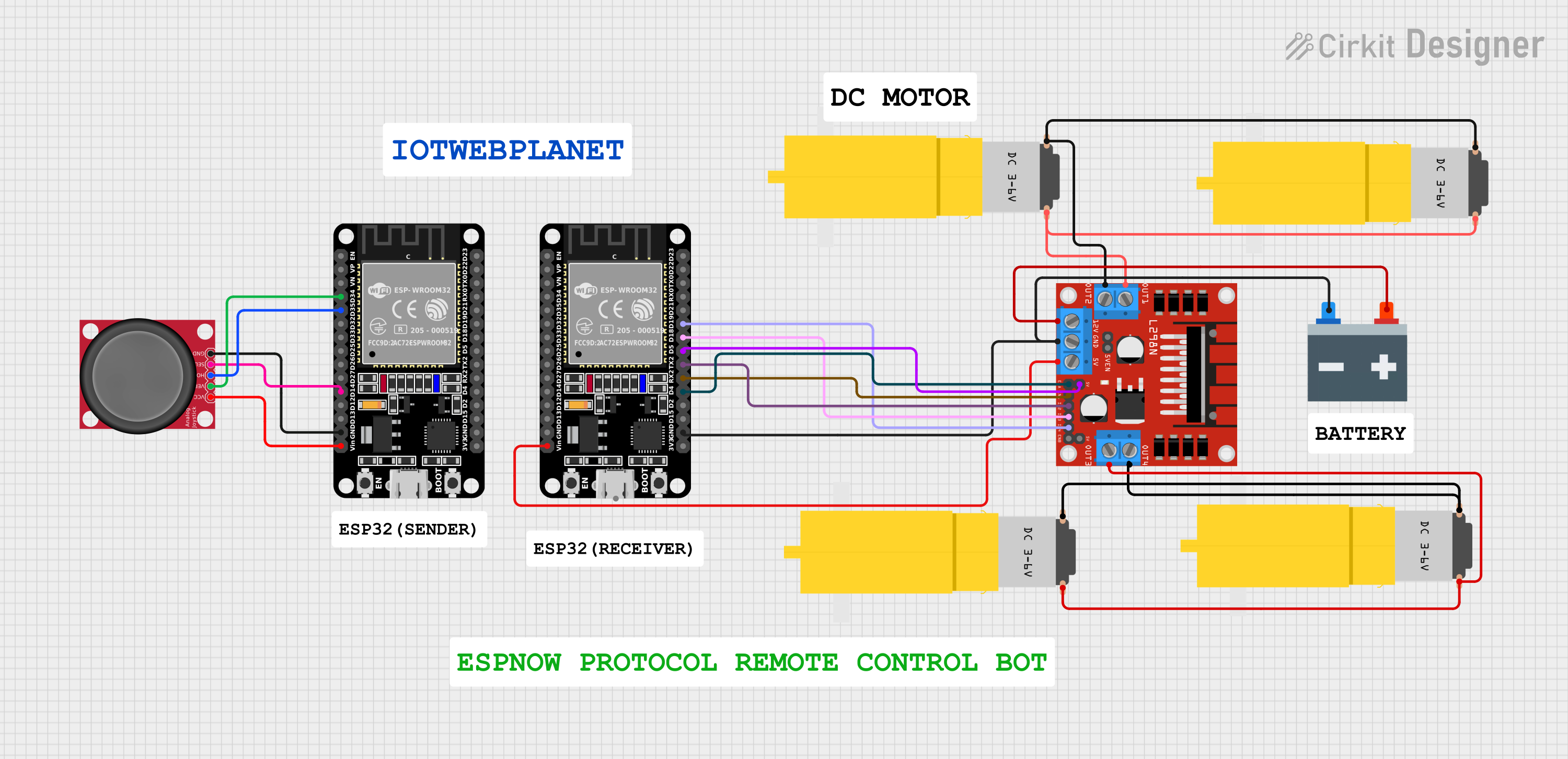
ESP32 Joystick Controlled Robot Using ESP-NOW Protocol & L298N Motor Driver

ESP32 Joystick Controlled Robot Using ESP-NOW Protocol & L298N Motor Driver

๐Ÿค– ESP32 Joystick Controlled Robot Using ESP-NOW Protocol & L298N Motor DriverWireless bot control w...
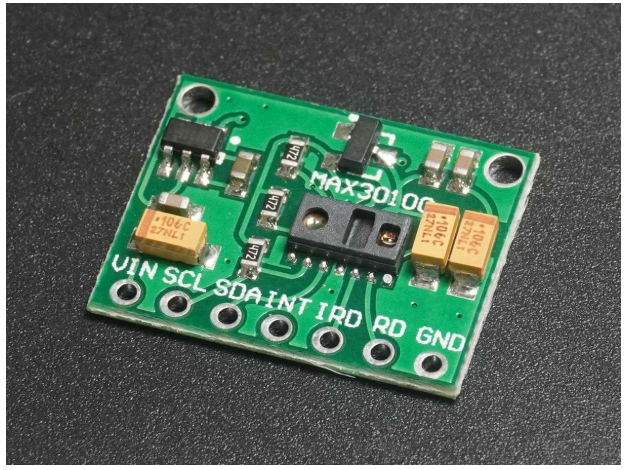
ESP32 with MAX30100 HEART SENSOR

ESP32 with MAX30100 HEART SENSOR

โค๏ธ Heart Rate & SpOโ‚‚ Sensor (MAX30100/MAX30102)๐Ÿ”ฌ Pulse Sensor | SpOโ‚‚ Monitor | Wearable Health Tech...